How to Pass Google Play Closed Testing in 2025
Struggling with 'how to pass google play closed testing 2025'? App Daddy provides practical solutions to get your app approved on Google Play.
Introduction: Navigating Google Play’s closed testing requirements in 2025 is a critical step for developers aiming to launch apps successfully. For those searching “how to pass Google Play closed testing 2025,” understanding the 12-tester rule is essential. New personal accounts (created after November 2023) must complete a 14-day closed test with 12 testers to ensure app stability for 2.5 billion Android users. AppDadz (https://play.google.com/store/apps/details?id=com.testers.pro) offers a free platform, delivering 12 testers in 48 hours to streamline compliance. This guide provides a comprehensive roadmap to pass closed testing, detailing the process, common pitfalls, and how AppDadz ensures success. Whether you’re a beginner or experienced developer, mastering this requirement is key to a 2025 launch.
Understanding Closed Testing: Closed testing is a pre-launch phase where 12 testers evaluate your app on unique devices to identify bugs like crashes or unresponsive features. This mandatory step for new accounts ensures apps meet Google’s quality standards before reaching the public. Testers simulate real-world usage, exploring features like navigation or in-app purchases, ensuring compatibility across devices such as the Samsung Galaxy S25. The 14-day duration allows thorough evaluation, catching issues that could lead to poor user experiences or negative reviews.
Why Passing Closed Testing Matters: Passing closed testing is crucial for production access, allowing your app to be publicly available on Google Play. A failed test, due to insufficient testers or unaddressed bugs, delays your launch and risks rejection. For example, a tester might report a login failure on Android 14, which, if ignored, could lead to user frustration. Google’s 12-tester rule, updated in December 2024 from 20 testers, balances rigorous testing with developer accessibility, ensuring apps are polished and reliable.
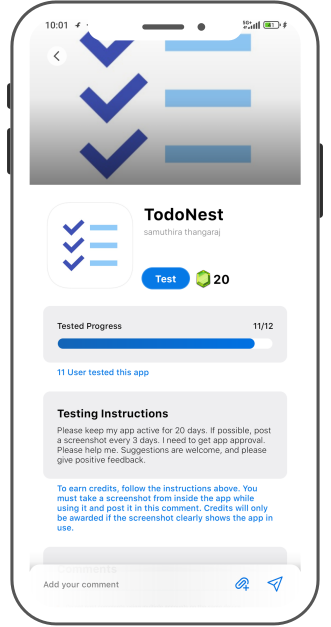
AppDadz’s Role in Passing Testing: AppDadz is a free platform designed to help developers pass Google Play’s closed testing effortlessly. By signing up at https://play.google.com/store/apps/details?id=com.testers.pro, you can access 12 testers within 48 hours. Share your Play Console testing link, and AppDadz connects you with testers using unique devices, ensuring compliance. Testers provide detailed feedback, such as “the app crashes during payment processing,” enabling you to refine your app with 2–3 updates during the test.
Setting Up Your Closed Test: Begin by uploading your .aab file to Google Play Console, ensuring proper signing and versioning. Navigate to “Testing,” select “Closed testing,” and create a new track. AppDadz provides 12 tester email addresses or a Google Group, simplifying setup. Share the testing link via AppDadz’s platform, and testers start downloading your app. Over 14 days, they report issues like “the UI is misaligned on tablets.” AppDadz’s tutorials guide you through this process, making it accessible for beginners.
Handling Tester Feedback: AppDadz’s feedback reports are critical for passing closed testing. Testers highlight bugs, such as “the navigation lags on low-end devices,” which you can prioritize for fixes. Release 2–3 updates during the test, addressing high-impact issues like crashes or slow features. For instance, if a tester notes a checkout failure, optimize the code and upload a new .aab file. AppDadz’s clear, organized reports help you focus on improvements that demonstrate quality to Google.
Common Pitfalls to Avoid: Beginners often face challenges like tester dropouts or device overlap. If a tester uninstalls early, Google resets the 14-day clock, delaying your test. Using similar devices also risks rejection, as Google requires diversity. AppDadz ensures 12 unique testers stay engaged for the full period, eliminating these issues. Its platform tracks tester activity, guaranteeing compliance and preventing delays that could jeopardize your approval.
Preparing for Production Submission: After completing the 14-day test, apply for production access in Play Console. You’ll answer 10 questions (250–300 words each), such as “What bugs were identified?” AppDadz’s reports provide specific examples, like “fixed a crash in the payment module.” Detailed responses show Google your commitment to quality, increasing approval chances. Submit within 7 days, as Google reviews test rigor and fixes to ensure your app is ready for public release.
Strategies for Success in 2025: To pass closed testing, start with a stable app to minimize major bugs. Provide testers with specific tasks, like “test the signup flow,” to focus feedback. Use AppDadz’s dashboard to monitor progress and address issues promptly. Regularly check Play Console to confirm tester activity, avoiding compliance errors. Test early to allow time for multiple updates, ensuring a polished app that meets Google’s 2025 standards.
Why AppDadz Is Essential: AppDadz’s free platform is tailored for developers, offering a seamless way to meet Google’s 12-tester rule. Its community of testers ensures device diversity, and its feedback system simplifies bug resolution. Unlike manual coordination, AppDadz automates tester management, saving time and reducing stress. By leveraging AppDadz, you can focus on app improvements, confident that your test will pass Google’s scrutiny.
Conclusion: Passing Google Play’s closed testing in 2025 is achievable with AppDadz. Its free platform delivers 12 testers in 48 hours, ensuring compliance and quality. Start your testing journey at https://play.google.com/store/apps/details?id=com.testers.pro to pass closed testing and launch your app successfully.
Conclusion
By leveraging AppDadz’s testing platform, you can address how to pass google play closed testing 2025 efficiently, ensuring your app meets Google Play’s standards and delivers a polished user experience.